
- Posts: 58
Options for creating a custom registration form
- Jocelyn Garner
-
 Topic Author
- Offline
- Senior Member
-

Less
More
14 years 3 months ago - 14 years 3 months ago #11
by Jocelyn Garner
Replied by Jocelyn Garner on topic Re: Options for creating a custom registration form
Antonio, can you tell me what to put in the blanks below the User Profile selection? Here is what I believe should be the correct information:
Form Path: /plugins/user/profile5/profiles/profile.xml
J1.6+ Profile plugin : profile5
When I try to open the Mappings tab, I get this error:
=============================
500 - An error has occurred.
XML file did not load
Return to Control Panel
=============================
I looked through j16profiles.php and I can't tell if it's the loadFile on line 248 that's failing or the simplexml_load_File that's failing. I've attached my plugin ZIP file, in case you can see anything obvious that is wrong or missing.
I am completely blocked until this is resolved.
Thanking you in advance,
Form Path: /plugins/user/profile5/profiles/profile.xml
J1.6+ Profile plugin : profile5
When I try to open the Mappings tab, I get this error:
=============================
500 - An error has occurred.
XML file did not load
Return to Control Panel
=============================
I looked through j16profiles.php and I can't tell if it's the loadFile on line 248 that's failing or the simplexml_load_File that's failing. I've attached my plugin ZIP file, in case you can see anything obvious that is wrong or missing.
I am completely blocked until this is resolved.
Thanking you in advance,
Last edit: 14 years 3 months ago by Jocelyn Garner.
Please Log in or Create an account to join the conversation.
- Antonio Durán
-

- Offline
- Moderator
-

Less
More
- Posts: 7848
14 years 3 months ago #12
by Antonio Durán
Replied by Antonio Durán on topic Re: Options for creating a custom registration form
I am sorry, but I think I cannot help,as I have never created a profile plugin myself, and would need to check documentation and code to know what is wrong.
As for integrating Joomlarra: please write to development@joomdle.com if you are interested in sponsoring development.
As for integrating Joomlarra: please write to development@joomdle.com if you are interested in sponsoring development.
Please Log in or Create an account to join the conversation.
- Jocelyn Garner
-
Topic Author
- Offline
- Senior Member
-
Less
More
- Posts: 58
14 years 2 months ago #13
by Jocelyn Garner
Replied by Jocelyn Garner on topic Re: Options for creating a custom registration form
I never got a resolution as to why my user profile plugin wouldn't work, but Hikashop in their latest version (1.5. has provided a solution for the time being. I created the custom fields we need in their component, and those fields now display within the Joomla user profile area. It's not installed as a plugin per se, but after creating a menu option to what they refer to as "user conrol panel," one of the links in that area displays all of the custom fields along with the usual Joomla user info (name, email, password). I'm including this information for the benefit of others who might bump into the user profile plugin problem.
has provided a solution for the time being. I created the custom fields we need in their component, and those fields now display within the Joomla user profile area. It's not installed as a plugin per se, but after creating a menu option to what they refer to as "user conrol panel," one of the links in that area displays all of the custom fields along with the usual Joomla user info (name, email, password). I'm including this information for the benefit of others who might bump into the user profile plugin problem. Please Log in or Create an account to join the conversation.
- Phil
- Offline
- Junior Member
-

Less
More
- Posts: 20
14 years 1 month ago #14
by Phil
Replied by Phil on topic Re: Options for creating a custom registration form
This thread has been very helpful for me, thank you!
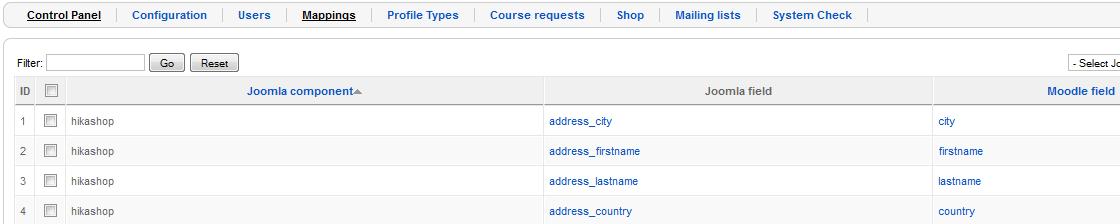
I have set up Joomdle successfully and users can purchase a course via the standard paypal method in joomdle/moodle. However, I am now hoping to use Hikashop to capture extra fields during registration (firstname, lastname, city, country).
I have tried mapping these fields in the Joomdle interface so that they link up with the corrosponding Moodle field. However, the data is not being sent to moodle when I try registering with the hikashop reg form on the site.
I have attached a screenshot of the mappings I have set up, I'm sure they are correct?
Any ideas what might be causing the mappings to fail?
Hikashop 1.5.8 (which was installed before Joomdle)
Joomdle 0.82
Joomla 1.5.26
I have set up Joomdle successfully and users can purchase a course via the standard paypal method in joomdle/moodle. However, I am now hoping to use Hikashop to capture extra fields during registration (firstname, lastname, city, country).
I have tried mapping these fields in the Joomdle interface so that they link up with the corrosponding Moodle field. However, the data is not being sent to moodle when I try registering with the hikashop reg form on the site.
I have attached a screenshot of the mappings I have set up, I'm sure they are correct?
Any ideas what might be causing the mappings to fail?
Hikashop 1.5.8 (which was installed before Joomdle)
Joomdle 0.82
Joomla 1.5.26
Please Log in or Create an account to join the conversation.
- Phil
- Offline
- Junior Member
-
Less
More
- Posts: 20
14 years 1 month ago #15
by Phil
Replied by Phil on topic Re: Options for creating a custom registration form
This is the registration form:
www.environmental-academy.net/index.php?...l=user&task=form
Please Log in or Create an account to join the conversation.
- Jocelyn Garner
-
Topic Author
- Offline
- Senior Member
-
Less
More
- Posts: 58
14 years 1 month ago - 14 years 1 month ago #16
by Jocelyn Garner
Replied by Jocelyn Garner on topic Re: Options for creating a custom registration form
I did exactly the same thing to start with, mapping extra fields added to Joomla to fields in Moodle. When I couldn't get the Joomla registration form with my user profile fields to be the primary data-catching mechanism for those extra mapped fields, I abandoned any attempt at extra fields in Joomla OR Moodle (deleted them in both Joomla and Moodle) and just captured the extra fields in Hikashop. That data is visible and updatable by students after the fact in the Hikashop User Control Panel but I am disappointed that the extra field data is completely disconnected from Moodle. That leaves me with 4 places for user data: Joomla, Moodle, Hikashop, and in my case Kunena.
As it turns out, the only person interested in the additional data is the site owner, so having the data in Hikashop and visible in Joomla is acceptable. We use Kunena for our discussion groups and our public forum (it's more full-featured than the Moodle forum) and that's where our users are uploading their photos and putting in personal contact data. I hid or disabled everything I could that Moodle duplicated, and I'm trying to use the Joomla interface, but I've still got some hitches in my installation that are preventing me from using Joomla as the sole user interface.
After this current course I plan to duplicate my installation and try to debug why I still can't view quizzes in the Joomdle views.
Toolie
As it turns out, the only person interested in the additional data is the site owner, so having the data in Hikashop and visible in Joomla is acceptable. We use Kunena for our discussion groups and our public forum (it's more full-featured than the Moodle forum) and that's where our users are uploading their photos and putting in personal contact data. I hid or disabled everything I could that Moodle duplicated, and I'm trying to use the Joomla interface, but I've still got some hitches in my installation that are preventing me from using Joomla as the sole user interface.
After this current course I plan to duplicate my installation and try to debug why I still can't view quizzes in the Joomdle views.
Toolie
Last edit: 14 years 1 month ago by Jocelyn Garner.
Please Log in or Create an account to join the conversation.
- Phil
- Offline
- Junior Member
-
Less
More
- Posts: 20
14 years 1 month ago #17
by Phil
Replied by Phil on topic Re: Options for creating a custom registration form
Thanks for your response, Jocelyn. It is rare to get such comprehensive and useful posts in online forums 
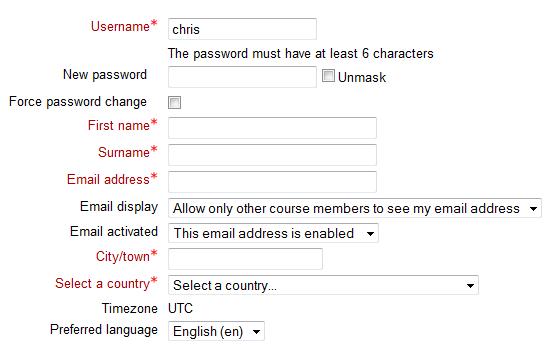
The primary issue for me is in capturing the 'city' and 'country' data so that Moodle does not request this extra info when they sign in. Have you experienced this issue?
However, I have a new problem! :blink: I've just tried removing the mappings entirely and registering with the standard Joomla registration form. Now, when a user registers, none of the data is sent to moodle except their username. Even the email in Moodle is blank.
I don't even know where to start with that? All I did was remove the mappings and now no data is beying sent at all. My setup worked with the standard Joomla registration just before creating the mappings, surely it should just revert back to those setttings once the mappings are removed?
Antonio, do you have any idea what might have caused this?
The primary issue for me is in capturing the 'city' and 'country' data so that Moodle does not request this extra info when they sign in. Have you experienced this issue?
However, I have a new problem! :blink: I've just tried removing the mappings entirely and registering with the standard Joomla registration form. Now, when a user registers, none of the data is sent to moodle except their username. Even the email in Moodle is blank.
I don't even know where to start with that? All I did was remove the mappings and now no data is beying sent at all. My setup worked with the standard Joomla registration just before creating the mappings, surely it should just revert back to those setttings once the mappings are removed?
Antonio, do you have any idea what might have caused this?
Please Log in or Create an account to join the conversation.
- Jocelyn Garner
-
Topic Author
- Offline
- Senior Member
-
Less
More
- Posts: 58
14 years 1 month ago - 14 years 1 month ago #18
by Jocelyn Garner
Replied by Jocelyn Garner on topic Re: Options for creating a custom registration form
You pretty much cannot use the standard Joomla Registration form; you need to use Hikashop's registration and put the extra fields in there. Take a look at:
www.terpsavvy.com <-- click on the Register for NIC Knowledge Prep - Click to Enroll and Pay link
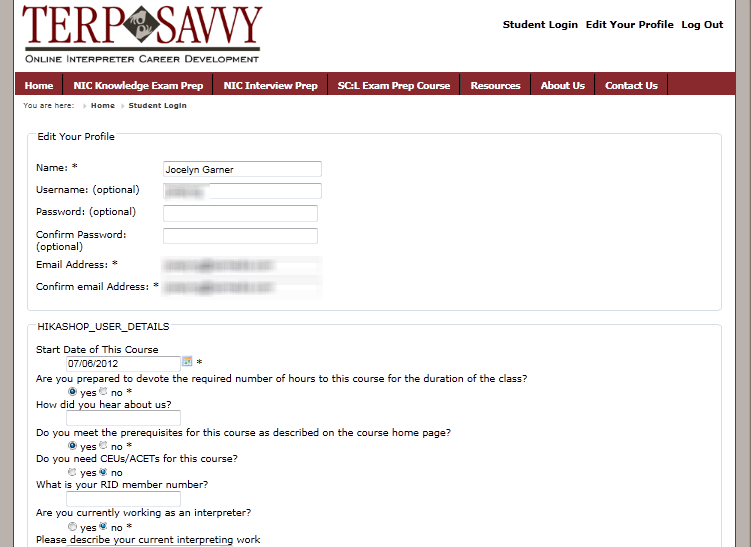
What you'll see there is the Hikashop registration with extra fields added to Hikashop. The only data that will get to Moodle is the username and password, as you've discovered.
The good news is that Hikashop provides a view of these additional fields in their User Control Panel. I mapped that view to the Edit Your Profile link in the website's header. (see attached) I guess you have to ask yourself whether you want to have your Joomla site as your primary interface or Moodle as your primary interface. I'm trying to use as much as Joomla can give me. Antonio certainly has provided most of the views that you'd want to otherwise see in Moodle.
Antonio, it agree that it would be really helpful to pass the City and Country information over to Moodle (and vice versa) as a minimum data exchange. Maybe you can add that to an upcoming release.
Toolie
www.terpsavvy.com <-- click on the Register for NIC Knowledge Prep - Click to Enroll and Pay link
What you'll see there is the Hikashop registration with extra fields added to Hikashop. The only data that will get to Moodle is the username and password, as you've discovered.
The good news is that Hikashop provides a view of these additional fields in their User Control Panel. I mapped that view to the Edit Your Profile link in the website's header. (see attached) I guess you have to ask yourself whether you want to have your Joomla site as your primary interface or Moodle as your primary interface. I'm trying to use as much as Joomla can give me. Antonio certainly has provided most of the views that you'd want to otherwise see in Moodle.
Antonio, it agree that it would be really helpful to pass the City and Country information over to Moodle (and vice versa) as a minimum data exchange. Maybe you can add that to an upcoming release.
Toolie
Last edit: 14 years 1 month ago by Jocelyn Garner.
Please Log in or Create an account to join the conversation.
- Phil
- Offline
- Junior Member
-
Less
More
- Posts: 20
14 years 1 month ago #19
by Phil
Replied by Phil on topic Re: Options for creating a custom registration form
Hi Jocelyn, that's very helpful, thank you.
I will be creating a similar system to this in the future, however I am also very keen on transfering the city and country fields to moodle as described earlier. Once i get this fixed I will try out the extra profile information in the method you have suggested.
I have created a new thread for this issue since it is slightly off-topic here - www.joomdle.com/en/forum/r08-support/895...ds-mapped-to-joomdle
Hopefully someone can help! Joomdle is such a great project but my experience so far has been a difficult one!
I will be creating a similar system to this in the future, however I am also very keen on transfering the city and country fields to moodle as described earlier. Once i get this fixed I will try out the extra profile information in the method you have suggested.
I have created a new thread for this issue since it is slightly off-topic here - www.joomdle.com/en/forum/r08-support/895...ds-mapped-to-joomdle
Hopefully someone can help! Joomdle is such a great project but my experience so far has been a difficult one!
Please Log in or Create an account to join the conversation.