
- Posts: 58
Options for creating a custom registration form
- Jocelyn Garner
-
 Topic Author
- Offline
- Senior Member
-

Less
More
14 years 4 months ago #1
by Jocelyn Garner
Options for creating a custom registration form was created by Jocelyn Garner
We are using the latest versions of Joomla (2.5.4), Joomdle (0.81) and Moodle (2.2). I am not new to Joomla but I am new to Moodle.I am still trying to wrap my head around how Joomdle integrates with Hikashop and Moodle, so forgive me if this is a newbie question.
My client wants to have an extended registration form and wants to have the answers to the extra questions stored as retrievable fields, like profile fields more or less. We are NOT using JomSocial (these students don't stick around, they take their tests and leave), so using your Profile Types integration is not an option.
I see that I can create custom fields in Hikashop, but only if I have Business edition (we bought the Essential version). Could I use those extra Hikashop custom fields in the Joomdle mapping section? If so, what am I mapping to? Could I use some other data retrieval extension to gain access to those custom fields to display them in conjunction with the basic Joomla user fields?
If this is not the route to take, can you suggest what I should be using to create a custom registration form and how to retrieve that additional data?
Your wisdom and advice is most appreciated.
Toolie
My client wants to have an extended registration form and wants to have the answers to the extra questions stored as retrievable fields, like profile fields more or less. We are NOT using JomSocial (these students don't stick around, they take their tests and leave), so using your Profile Types integration is not an option.
I see that I can create custom fields in Hikashop, but only if I have Business edition (we bought the Essential version). Could I use those extra Hikashop custom fields in the Joomdle mapping section? If so, what am I mapping to? Could I use some other data retrieval extension to gain access to those custom fields to display them in conjunction with the basic Joomla user fields?
If this is not the route to take, can you suggest what I should be using to create a custom registration form and how to retrieve that additional data?
Your wisdom and advice is most appreciated.
Toolie
Please Log in or Create an account to join the conversation.
- Jocelyn Garner
-
Topic Author
- Offline
- Senior Member
-
Less
More
- Posts: 58
14 years 4 months ago #2
by Jocelyn Garner
Replied by Jocelyn Garner on topic Re: Options for creating a custom registration form
Since I first posted this question, I have done some more research, and it looks like ExtendedReg from
www.jvitals.com
would provide the extra registration fields we need. I would set up the registration form then send the user over to HikaShop to pay for the course.
I just spotted this post, and I'm wondering whether you decided to pursue a plugin so that we COULD use ExtendedReg:
www.joomdle.com/en/forum/r07-support/7667-sso-not-working
Thanks,
Toolie
I just spotted this post, and I'm wondering whether you decided to pursue a plugin so that we COULD use ExtendedReg:
www.joomdle.com/en/forum/r07-support/7667-sso-not-working
Thanks,
Toolie
Please Log in or Create an account to join the conversation.
- Antonio Durán
-

- Offline
- Moderator
-

Less
More
- Posts: 7848
14 years 4 months ago #3
by Antonio Durán
Replied by Antonio Durán on topic Re: Options for creating a custom registration form
Hi.
Profile types are not related to this. That is for types of users. What you need is just new profile fields.
In fact, you don't say if you need to map those to Moodle, as you don't seem to know what to map to. If you only use them in Joomla, I guess you can use Hikashop as you say.
You could also create/modify Joomla profile plugin to have all the fields you want. These can be then mapped to Moodle fields.
I did a quick search and I could not find any info on how to add custom fields to Hikashop profile, and that is something that has never been tested with Joomdle, so I don't know if it will work out of the box.
ExtendedReg has not been integrated with Joomdle.
Profile types are not related to this. That is for types of users. What you need is just new profile fields.
In fact, you don't say if you need to map those to Moodle, as you don't seem to know what to map to. If you only use them in Joomla, I guess you can use Hikashop as you say.
You could also create/modify Joomla profile plugin to have all the fields you want. These can be then mapped to Moodle fields.
I did a quick search and I could not find any info on how to add custom fields to Hikashop profile, and that is something that has never been tested with Joomdle, so I don't know if it will work out of the box.
ExtendedReg has not been integrated with Joomdle.
Please Log in or Create an account to join the conversation.
- Jocelyn Garner
-
Topic Author
- Offline
- Senior Member
-
Less
More
- Posts: 58
14 years 4 months ago #4
by Jocelyn Garner
Replied by Jocelyn Garner on topic Re: Options for creating a custom registration form
Thank you for your response, Antonio, and for what I consider to be a marvelous piece of work you've done here! I am new to Moodle and Joomdle so I don't know all of the intricacies of these two pieces of software. I appreciate your patience with what must seem like newbie questions.
Thank you for reminding me about the differences between profile fields and profile types. You are right, I don't need profile types, but I also am unaware of exactly which "Joomla profile plugin" you are referring to. I dug around a bit just now and it looks like you're talking about customizing the built-in profile. I would appreciate some pointers to how this is done. I know how to work in XML, if that's what's required. My need is similar to Francisco's in this post:
www.joomdle.com/en/forum/r08-support/830...-plugin-or-otherwise
To answer your other question, my client has custom questions needed for registration, but the information needs to be visible somehow afterwards. I do not plan to expose the Moodle interface but rather use the Wrapper function to pull Moodle into the Joomla theme. If that means we use Joomla's abilities to display this information, that's fine.
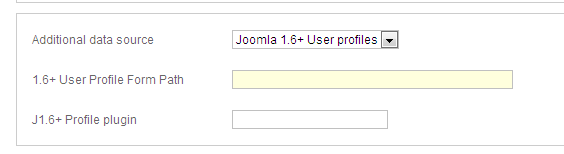
There is one more possibility for creating a registration form, and that's RSFormPro. It has the ability to map to fields in a table either inside or outside of Joomla's database. If I created a form that mapped to extra fields in Joomla's profile table, then I could map to those fields between Moodle and Joomla, is that correct? Is that how I'd use the fields in the attached screen capture? I am not sure what you mean by User Profile Form Path, is that an Article ID?
I really appreciate your guidance, Antonio.
Toolie
Thank you for reminding me about the differences between profile fields and profile types. You are right, I don't need profile types, but I also am unaware of exactly which "Joomla profile plugin" you are referring to. I dug around a bit just now and it looks like you're talking about customizing the built-in profile. I would appreciate some pointers to how this is done. I know how to work in XML, if that's what's required. My need is similar to Francisco's in this post:
www.joomdle.com/en/forum/r08-support/830...-plugin-or-otherwise
To answer your other question, my client has custom questions needed for registration, but the information needs to be visible somehow afterwards. I do not plan to expose the Moodle interface but rather use the Wrapper function to pull Moodle into the Joomla theme. If that means we use Joomla's abilities to display this information, that's fine.
There is one more possibility for creating a registration form, and that's RSFormPro. It has the ability to map to fields in a table either inside or outside of Joomla's database. If I created a form that mapped to extra fields in Joomla's profile table, then I could map to those fields between Moodle and Joomla, is that correct? Is that how I'd use the fields in the attached screen capture? I am not sure what you mean by User Profile Form Path, is that an Article ID?
I really appreciate your guidance, Antonio.
Toolie
Please Log in or Create an account to join the conversation.
- Jocelyn Garner
-
Topic Author
- Offline
- Senior Member
-
Less
More
- Posts: 58
14 years 3 months ago - 14 years 3 months ago #5
by Jocelyn Garner
Replied by Jocelyn Garner on topic Re: Options for creating a custom registration form
I may have found a solution. Turns out Joomlarra has a Joomla 2.5.x version of their User Import/Export tool:
www.joomlarra.com/joomla-2.5-user-export...-profile-fields.html
Apparently it will take care of creating the custom fields in the Joomla User Profile plugin (finally found THAT). I plan to spend the US$9.99 to buy the extension even though I don't really have users to import for THIS client (I do for another). I will then create matching fields on the Moodle side and map them to each other through the Mappings tab.
Can you confirm the correct usage of the fields in the attached image? What goes in each field? I am still a little fuzzy on that.
Thanks,
Toolie
www.joomlarra.com/joomla-2.5-user-export...-profile-fields.html
Apparently it will take care of creating the custom fields in the Joomla User Profile plugin (finally found THAT). I plan to spend the US$9.99 to buy the extension even though I don't really have users to import for THIS client (I do for another). I will then create matching fields on the Moodle side and map them to each other through the Mappings tab.
Can you confirm the correct usage of the fields in the attached image? What goes in each field? I am still a little fuzzy on that.
Thanks,
Toolie

Last edit: 14 years 3 months ago by Jocelyn Garner.
Please Log in or Create an account to join the conversation.
- Antonio Durán
-
- Offline
- Moderator
-
Less
More
- Posts: 7848
14 years 3 months ago #6
by Antonio Durán
Replied by Antonio Durán on topic Re: Options for creating a custom registration form
Hi.
I don't know how joomlarra works, but for using it in Joomdle mappings you will need that it provides an XML form file with all the new profile fields.
This is what you need to enter in profile form path.
In profile plugin you enter the key used by the profile plugin (you can see it in the database)
I don't know how joomlarra works, but for using it in Joomdle mappings you will need that it provides an XML form file with all the new profile fields.
This is what you need to enter in profile form path.
In profile plugin you enter the key used by the profile plugin (you can see it in the database)
Please Log in or Create an account to join the conversation.
- Jocelyn Garner
-
Topic Author
- Offline
- Senior Member
-
Less
More
- Posts: 58
14 years 3 months ago - 14 years 3 months ago #7
by Jocelyn Garner
Replied by Jocelyn Garner on topic Re: Options for creating a custom registration form
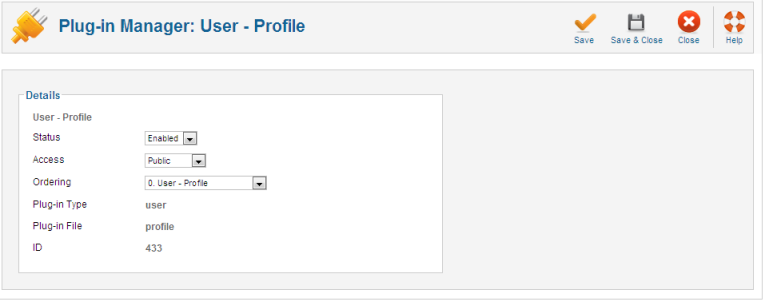
Hi Antonio, Joomlarra made adding the User Profile custom fields very easy. It directly modified the existing Joomla User Profile Plugin, so I'm not sure what to put in the form fields for the Joomla 1.6+ profile area in the Configuration screen. From reading your documentation, it seems like I would leave the fields empty. Joomlarra added the fields in a separate table, arra_users_profile, but did not enter any records in the user_profiles table.
But now I can't see any profile fields in the plugin configuration: the screen is where the Basic Options would appear is blank. (see attached). Any idea what might cause this problem?
But now I can't see any profile fields in the plugin configuration: the screen is where the Basic Options would appear is blank. (see attached). Any idea what might cause this problem?
Last edit: 14 years 3 months ago by Jocelyn Garner.
Please Log in or Create an account to join the conversation.
- Antonio Durán
-
- Offline
- Moderator
-
Less
More
- Posts: 7848
14 years 3 months ago #8
by Antonio Durán
Replied by Antonio Durán on topic Re: Options for creating a custom registration form
If it uses a different table for storing data, you cannot use with Joomdle directly.
It would need to be integrated like we did with Jomsocial, VM, etc...
It would need to be integrated like we did with Jomsocial, VM, etc...
Please Log in or Create an account to join the conversation.
- Jocelyn Garner
-
Topic Author
- Offline
- Senior Member
-
Less
More
- Posts: 58
14 years 3 months ago #9
by Jocelyn Garner
Replied by Jocelyn Garner on topic Re: Options for creating a custom registration form
YES, would you consider integrating Joomlarra's approach. I plan to do many more of these combinations, and there will be clients who do not have interest in integrating with or using Jomsocial or Community Builder.
As for this situation, if I can move the created data to another table, what table would that be? Would I create my own plugin using the instructions in this documentation?
docs.joomla.org/Creating_a_profile_plugin
I'm really not an adequate programmer to create a plugin myself, but if the instructions here are sufficient, I will adapt them. I at least already have a correctly formatted XML file, and can use that portion.
What do you think?
Toolie
As for this situation, if I can move the created data to another table, what table would that be? Would I create my own plugin using the instructions in this documentation?
docs.joomla.org/Creating_a_profile_plugin
I'm really not an adequate programmer to create a plugin myself, but if the instructions here are sufficient, I will adapt them. I at least already have a correctly formatted XML file, and can use that portion.
What do you think?
Toolie
Please Log in or Create an account to join the conversation.
- Jocelyn Garner
-
Topic Author
- Offline
- Senior Member
-
Less
More
- Posts: 58
14 years 3 months ago #10
by Jocelyn Garner
Replied by Jocelyn Garner on topic Re: Options for creating a custom registration form
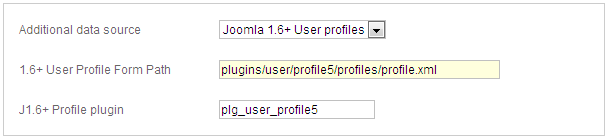
I went ahead and used the documentation example to create a custom profle plugin. The form is there; it installs correctly, the data is being saved, but the form is not retrieving the data. I will debug that part of it, but in the meantime, is this how the data should be filled in? (see attached)
Please, please be very specific because I am still confused.
Thanks,
Toolie
Please, please be very specific because I am still confused.
Thanks,
Toolie
Please Log in or Create an account to join the conversation.