
- Posts: 21
Shop / e-Commerce Integration
Weird bug with course after installing spanish in virtuemart
- pipelad
- Topic Author
- Offline
- Junior Member
-

Less
More
8 years 7 months ago #1
by pipelad
Weird bug with course after installing spanish in virtuemart was created by pipelad
Hello, so i created a bundle to test the bundle funcion, afterwards i installed spanish language on the site and did the translations for the products.
But with the test bundle i noticed it was un-published on the joomble shop integration, so i publised it and got a bug. Also missing the category with the product.
Any ideas? do i create a new bundle (as all the other bundles didnt give me any problem)
But with the test bundle i noticed it was un-published on the joomble shop integration, so i publised it and got a bug. Also missing the category with the product.
Any ideas? do i create a new bundle (as all the other bundles didnt give me any problem)
17.28.46.png)
17.29.03.png)
Please Log in or Create an account to join the conversation.
- pipelad
- Topic Author
- Offline
- Junior Member
-
Less
More
- Posts: 21
8 years 7 months ago #2
by pipelad
Replied by pipelad on topic Weird bug with course after installing spanish in virtuemart
Also i just noticed, i entered on anothe product and tryed to add a image and it disapeared,
Please Log in or Create an account to join the conversation.
- Antonio Durán
-

- Offline
- Moderator
-

Less
More
- Posts: 7848
8 years 7 months ago #3
by Antonio Durán
Replied by Antonio Durán on topic Weird bug with course after installing spanish in virtuemart
Hi.
That problem happens because of a duplicate slug in VM tables. Probably you have another product with the same name, and it auto-generates from name.
I have now updated the plugin do correctly deal with this, adding -1, -2, etc, as VM does.
In order to get it working, you can do these mods to plugins/joomdleshop/joomdlevirtuemart/joomdlevirtuemart.php
Add this function:
And in function onSellCourses ():
After:
Add:
As for the image problem: are you able to replicate it? Can you give me directions on how I can try ?
That problem happens because of a duplicate slug in VM tables. Probably you have another product with the same name, and it auto-generates from name.
I have now updated the plugin do correctly deal with this, adding -1, -2, etc, as VM does.
In order to get it working, you can do these mods to plugins/joomdleshop/joomdlevirtuemart/joomdlevirtuemart.php
Add this function:
Code:
private function get_valid_slug ($slug)
{
$db = JFactory::getDBO();
$langs = $this->get_langs ();
$i = 0;
while (1)
{
if ($i)
$new_slug = $slug . '-' . $i;
else $new_slug = $slug;
$valid = true;
foreach ($langs as $lang)
{
if (!$lang)
continue;
$query = "SELECT slug FROM #__virtuemart_products_$lang WHERE slug = " . $db->Quote($new_slug);
$db->setQuery($query);
$products = $db->loadObjectList();
if (count ($products) > 0)
{
$valid = false;
break;
}
}
if ($valid)
break;
$i++;
}
return $new_slug;
}
And in function onSellCourses ():
After:
Code:
$slug = JFilterOutput::stringURLSafe($name);
Code:
$slug = $this->get_valid_slug ($slug);
As for the image problem: are you able to replicate it? Can you give me directions on how I can try ?
Please Log in or Create an account to join the conversation.
- pipelad
- Topic Author
- Offline
- Junior Member
-
Less
More
- Posts: 21
8 years 7 months ago #4
by pipelad
Replied by pipelad on topic Weird bug with course after installing spanish in virtuemart
Hello, so i made the changes, and now im getting this:
"1064 You have an error in your SQL syntax; check the manual that corresponds to your MySQL server version for the right syntax to use near '-GB WHERE slug = 'sexto-y-septimo-test'' at line 1"
Previously i have activated english as it seemed that the products were created on the en-gb table but not on the es-es table, (this also seems to be the issue with images)
"1064 You have an error in your SQL syntax; check the manual that corresponds to your MySQL server version for the right syntax to use near '-GB WHERE slug = 'sexto-y-septimo-test'' at line 1"
Previously i have activated english as it seemed that the products were created on the en-gb table but not on the es-es table, (this also seems to be the issue with images)

Please Log in or Create an account to join the conversation.
- Antonio Durán
-
- Offline
- Moderator
-
Less
More
- Posts: 7848
8 years 7 months ago #5
by Antonio Durán
Replied by Antonio Durán on topic Weird bug with course after installing spanish in virtuemart
Hi.
I am sorry, but I don't know why you are getting this. I guess something is different at your site, and code is not correctly dealing with it. Is it possible to get access to your site to do some debugging live? If so, please write to development@joomdle.com and I will try to help.
As for images: I don't know yet what the problem is, so it would also probably be easier to see it at your site.
If access is not possible, let me know and we can try to solve it with you doing the debugging with my instructions.
I am sorry, but I don't know why you are getting this. I guess something is different at your site, and code is not correctly dealing with it. Is it possible to get access to your site to do some debugging live? If so, please write to development@joomdle.com and I will try to help.
As for images: I don't know yet what the problem is, so it would also probably be easier to see it at your site.
If access is not possible, let me know and we can try to solve it with you doing the debugging with my instructions.
Please Log in or Create an account to join the conversation.
- Antonio Durán
-
- Offline
- Moderator
-
Less
More
- Posts: 7848
8 years 7 months ago #6
by Antonio Durán
Replied by Antonio Durán on topic Weird bug with course after installing spanish in virtuemart
Hi again.
I did some more testing changing my configuration, and found that there was a problem with the code, that may also be causing the error you see.
To try it, modify the newly added function get_valid_slug ():
After:
Add:
I did some more testing changing my configuration, and found that there was a problem with the code, that may also be causing the error you see.
To try it, modify the newly added function get_valid_slug ():
After:
Code:
if (!$lang)
continue;
Code:
$lang = strtolower ($lang);
$lang = str_replace ('-', '_', $lang);
Please Log in or Create an account to join the conversation.
- pipelad
- Topic Author
- Offline
- Junior Member
-
Less
More
- Posts: 21
8 years 7 months ago #7
by pipelad
Replied by pipelad on topic Weird bug with course after installing spanish in virtuemart
So, it seems we are making progress, ill work on giving you acces to the site.
now the error has changed:
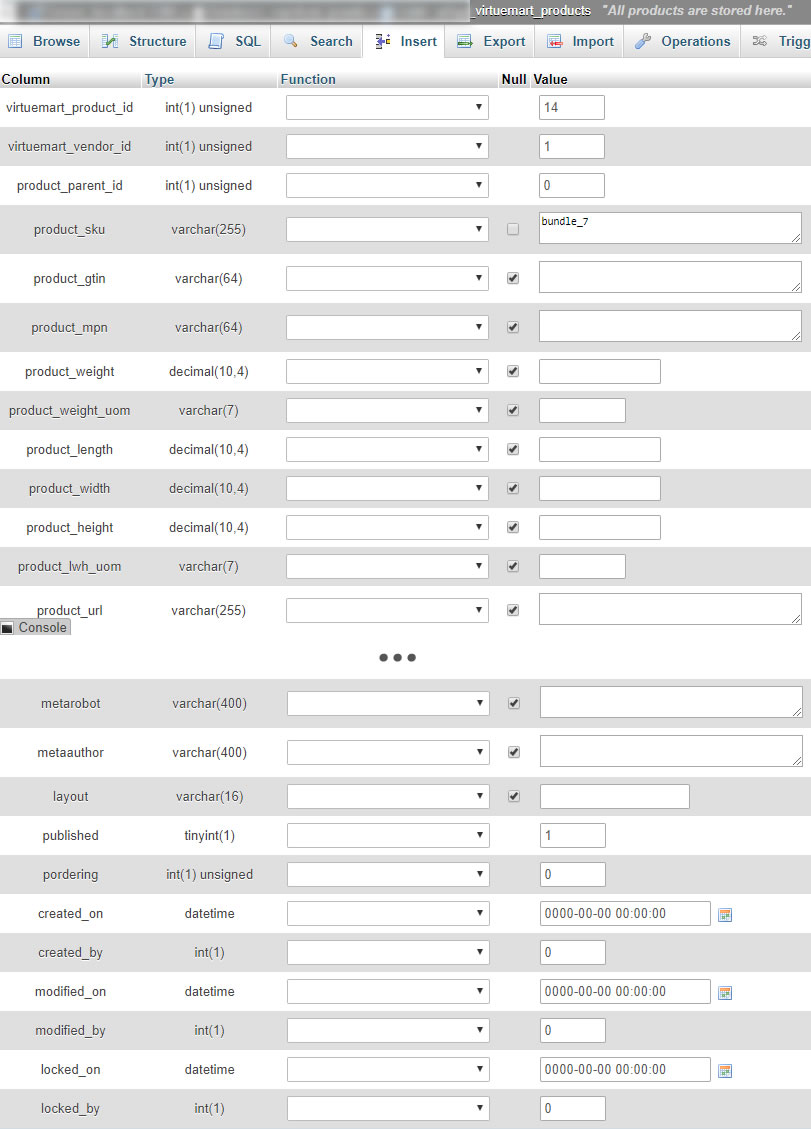
1062 Duplicate entry '14' for key 'PRIMARY'
The attached image was trying to publish the test bundle from the other post, and the entry 14 is in a test of a new bundle,
Other information that might be important:
i had in my virtumart configuration, for some reason, not only spanish as the main language, but also had spanish on the multi.lingual, so things ive done so far:
- eliminated all languages from multi-lingual
- ive changed the category from virtumart to test on a new category (eliminate the option that the category had some kind of bug due to the spanish intstalation)
- ive checked the database and found: there is a product with ID 14 on both #_virtuemart_products and #virtumart_products_es_es as seen in attached images. This product does not apear on the virtuemart product page but is seen as published on the joomble shop integration.
now the error has changed:
1062 Duplicate entry '14' for key 'PRIMARY'
The attached image was trying to publish the test bundle from the other post, and the entry 14 is in a test of a new bundle,
Other information that might be important:
i had in my virtumart configuration, for some reason, not only spanish as the main language, but also had spanish on the multi.lingual, so things ive done so far:
- eliminated all languages from multi-lingual
- ive changed the category from virtumart to test on a new category (eliminate the option that the category had some kind of bug due to the spanish intstalation)
- ive checked the database and found: there is a product with ID 14 on both #_virtuemart_products and #virtumart_products_es_es as seen in attached images. This product does not apear on the virtuemart product page but is seen as published on the joomble shop integration.


Please Log in or Create an account to join the conversation.
- Antonio Durán
-
- Offline
- Moderator
-
Less
More
- Posts: 7848
8 years 7 months ago #8
by Antonio Durán
Replied by Antonio Durán on topic Weird bug with course after installing spanish in virtuemart
Duplicate entry for Primary.... I think the only way this could happen is that there is an inconsistency between tables.
VM uses product_id as primary key in both products and products_LANG tables.
If there is an entry with ID=14 in a lang table, but not in product table, it would give this error.
So, maybe after all the testing we left something wrong in the database, as this should not happen. You can try "Trash" the course in Joomdle->Shop, and then create it again.
VM uses product_id as primary key in both products and products_LANG tables.
If there is an entry with ID=14 in a lang table, but not in product table, it would give this error.
So, maybe after all the testing we left something wrong in the database, as this should not happen. You can try "Trash" the course in Joomdle->Shop, and then create it again.
Please Log in or Create an account to join the conversation.
- pipelad
- Topic Author
- Offline
- Junior Member
-
Less
More
- Posts: 21
8 years 7 months ago #9
by pipelad
Replied by pipelad on topic Weird bug with course after installing spanish in virtuemart
It's also happening on new products on new category, i must have messed up something up.
I have sent you an e-mail with the username and password to access the site, please have a look and see if i have something we have missed on this topic.
Thank you.
I have sent you an e-mail with the username and password to access the site, please have a look and see if i have something we have missed on this topic.
Thank you.
Please Log in or Create an account to join the conversation.
- pipelad
- Topic Author
- Offline
- Junior Member
-
Less
More
- Posts: 21
8 years 7 months ago #10
by pipelad
Replied by pipelad on topic Weird bug with course after installing spanish in virtuemart
Hello, so updates:
1.) ive unistalled Virtuemart and joomdle integration plugins. After that i made a clean virtuemart installation, including reseting all database tables with the virtuemart tool.
This has fixed the issue with disapearing products, and the bug with edditing them.
2.) i created a brand new bundle, and i had the same duplicate error of the previous posts. BUT, the product did apear on the category, i could edit it, altho it did not come with price or category, (witch i added manualy)
this makes me think, could i make a compleatly clean installation of the shop integration? would this involve some database modifications? Also, if i added the category manually, will it still be able to sell and enroll estudents?
Ill keep in touch.
1.) ive unistalled Virtuemart and joomdle integration plugins. After that i made a clean virtuemart installation, including reseting all database tables with the virtuemart tool.
This has fixed the issue with disapearing products, and the bug with edditing them.
2.) i created a brand new bundle, and i had the same duplicate error of the previous posts. BUT, the product did apear on the category, i could edit it, altho it did not come with price or category, (witch i added manualy)
this makes me think, could i make a compleatly clean installation of the shop integration? would this involve some database modifications? Also, if i added the category manually, will it still be able to sell and enroll estudents?
Ill keep in touch.
Please Log in or Create an account to join the conversation.