
- Posts: 6
Multiple "Notice: Undefined index: type in" errors
- Win Morgan
- Topic Author
- Offline
- New Member
-

Less
More
14 years 4 weeks ago #1
by Win Morgan
Multiple "Notice: Undefined index: type in" errors was created by Win Morgan
Hello All:
I am trying to join the Joomdle community, but facing problems with my installation.
I could sure use some helpful advice/ suggestions.
I have set up Joomdle on a Joomla 1.5.23 platform on a dedicated server. I have Moodle 1.9 set up on the same server
I have followed the configuration steps for both Moodle and Joomdle as they are written.
The system health check says E_DEPRECATED errors are enabled in your PHP configuration
I have had my dedicated server manager disable this in the server PHP configuration, but I still get this notice. (?false positive)
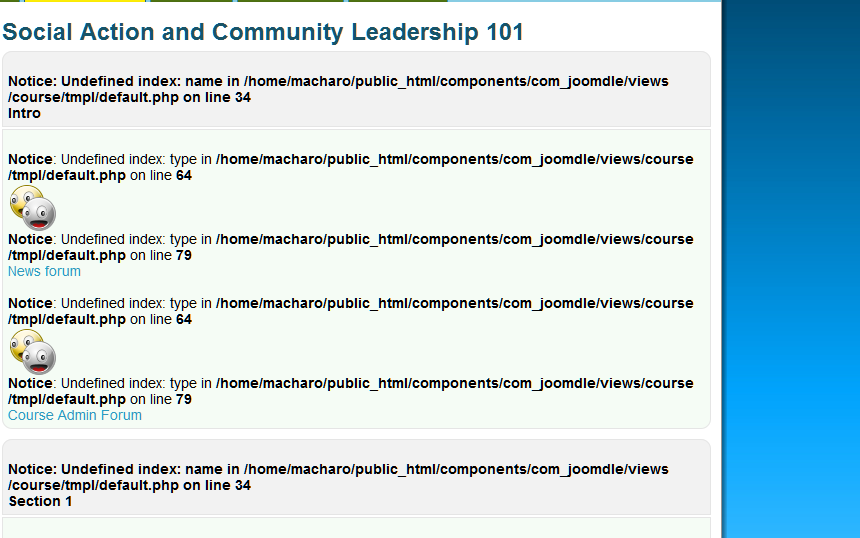
When I add a moodle course to the menu, I get multiple "Notice: Undefined index: type in.... errors. I have attached screenshots to help diagnosis.
WHAT SHOULD I DO TO RESOLVE THIS?
Thank you in advance for those who take the time to try to help this Joomdle baby.
I am trying to join the Joomdle community, but facing problems with my installation.
I could sure use some helpful advice/ suggestions.
I have set up Joomdle on a Joomla 1.5.23 platform on a dedicated server. I have Moodle 1.9 set up on the same server
I have followed the configuration steps for both Moodle and Joomdle as they are written.
The system health check says E_DEPRECATED errors are enabled in your PHP configuration
I have had my dedicated server manager disable this in the server PHP configuration, but I still get this notice. (?false positive)
When I add a moodle course to the menu, I get multiple "Notice: Undefined index: type in.... errors. I have attached screenshots to help diagnosis.
WHAT SHOULD I DO TO RESOLVE THIS?
Thank you in advance for those who take the time to try to help this Joomdle baby.
Please Log in or Create an account to join the conversation.
- Chris
-

- Offline
- Moderator
-

14 years 4 weeks ago #2
by Chris
Replied by Chris on topic Multiple "Notice: Undefined index: type in" errors
You can ignore the E_DEPRECATED notice. This is most likely because you are running an older php version on your server.
The other notices, I have not seen before. A quick search on the net suggests the following:
- Problem creating the database tables when using FTP as your Joomla install method. I suspect this has been fixed as these errors were reported with Release Candidates of Joomdle about 1 year ago.
- Your php reporting configuration - just showing notices rather than suppressing them
- File permissions in the server
- SEF URL alias. Are you using SEF? IF so, what happens when you turn off SEF?
The other notices, I have not seen before. A quick search on the net suggests the following:
- Problem creating the database tables when using FTP as your Joomla install method. I suspect this has been fixed as these errors were reported with Release Candidates of Joomdle about 1 year ago.
- Your php reporting configuration - just showing notices rather than suppressing them
- File permissions in the server
- SEF URL alias. Are you using SEF? IF so, what happens when you turn off SEF?
Please Log in or Create an account to join the conversation.
- Win Morgan
- Topic Author
- Offline
- New Member
-
Less
More
- Posts: 6
14 years 4 weeks ago #3
by Win Morgan
Replied by Win Morgan on topic Multiple "Notice: Undefined index: type in" errors
Hello Chris
Thank you for your quick response.
- Yes, I am running PHP Version 5.2.17. Glad I can ignore it.
- I've asked my server support to ensure that the php reporting config is suppressing notices
-File permissions in server are set to 755 for directories and 644 for files
- I am not using SEF
You can see the mess at
www.machar.org/index.php?option=com_joom...view=course&item=373
Appreciate your interest and support!
Thank you for your quick response.
- Yes, I am running PHP Version 5.2.17. Glad I can ignore it.
- I've asked my server support to ensure that the php reporting config is suppressing notices
-File permissions in server are set to 755 for directories and 644 for files
- I am not using SEF
You can see the mess at
www.machar.org/index.php?option=com_joom...view=course&item=373
Appreciate your interest and support!
Please Log in or Create an account to join the conversation.
- Win Morgan
- Topic Author
- Offline
- New Member
-
Less
More
- Posts: 6
14 years 4 weeks ago #4
by Win Morgan
Replied by Win Morgan on topic Multiple "Notice: Undefined index: type in" errors
Interesting.... when I click on the above URL, it says "No course selected."
But when I am logged into the site front end as administrator, it shows errors and shows links to course materials. however, if I click on them, I get either a 404 or I get sent to Moodle directly....
Hmmm.....
But when I am logged into the site front end as administrator, it shows errors and shows links to course materials. however, if I click on them, I get either a 404 or I get sent to Moodle directly....
Hmmm.....
Please Log in or Create an account to join the conversation.
- Win Morgan
- Topic Author
- Offline
- New Member
-
Less
More
- Posts: 6
14 years 4 weeks ago #5
by Win Morgan
Replied by Win Morgan on topic Multiple "Notice: Undefined index: type in" errors
But if I type in
machar.org/index.php?option=com_joomdle&view=course&Itemid=373
I get the errors page
machar.org/index.php?option=com_joomdle&view=course&Itemid=373
I get the errors page
Please Log in or Create an account to join the conversation.
- Win Morgan
- Topic Author
- Offline
- New Member
-
Less
More
- Posts: 6
14 years 4 weeks ago #6
by Win Morgan
Replied by Win Morgan on topic Multiple "Notice: Undefined index: type in" errors
Maybe a problem with www. vs no www? somewhere?
Please Log in or Create an account to join the conversation.
- Win Morgan
- Topic Author
- Offline
- New Member
-
Less
More
- Posts: 6
14 years 3 weeks ago #7
by Win Morgan
Replied by Win Morgan on topic Multiple "Notice: Undefined index: type in" errors
SOLVED: Just in case anyone else has a similar issue:
Change:
JOOMLA ADMIN > SITE>GLOBAL CONFIGURATION> SERVER> Server Settings> Error Reporting>Maximum
To:
JOOMLA ADMIN > SITE>GLOBAL CONFIGURATION> SERVER> Server Settings> Error Reporting>System Default
:blush:
Thank you for your kind attempts to assist me.
Change:
JOOMLA ADMIN > SITE>GLOBAL CONFIGURATION> SERVER> Server Settings> Error Reporting>Maximum
To:
JOOMLA ADMIN > SITE>GLOBAL CONFIGURATION> SERVER> Server Settings> Error Reporting>System Default
:blush:
Thank you for your kind attempts to assist me.
Please Log in or Create an account to join the conversation.
- Chris
-
- Offline
- Moderator
-
14 years 3 weeks ago #8
by Chris
Replied by Chris on topic Multiple "Notice: Undefined index: type in" errors
Great, glad you have found your answer. This appears to be suppressing messages.
I do note two things that you may wish to be cautious of, based on your thread above:
- if you are using www, ensure you use it everywhere in joomdle and moodle configurations, httaccess, joomla, etc. similarly if you are not using www than do not everywhere. the combination of sometimes yes and sometimes no can cause problems because technically www. and no www are different domains (subdomains). For me I rewrite mydomain.com to www.mydomain.com in httaccess and include the www in all my configs.
Logging in to the front end using admin. Be careful of this as Moodle doesn't have the ability to log in two users at once like joomla (frontend & backend). So if you have moodle logged into admin and then try to log a user into joomla frontend it will get screwy. I suggest that you run two browsers at once. One for admin work, say chrome and then for testing users, say FF. Thus you eliminate any chance of session confusion.
I do note two things that you may wish to be cautious of, based on your thread above:
- if you are using www, ensure you use it everywhere in joomdle and moodle configurations, httaccess, joomla, etc. similarly if you are not using www than do not everywhere. the combination of sometimes yes and sometimes no can cause problems because technically www. and no www are different domains (subdomains). For me I rewrite mydomain.com to www.mydomain.com in httaccess and include the www in all my configs.
Logging in to the front end using admin. Be careful of this as Moodle doesn't have the ability to log in two users at once like joomla (frontend & backend). So if you have moodle logged into admin and then try to log a user into joomla frontend it will get screwy. I suggest that you run two browsers at once. One for admin work, say chrome and then for testing users, say FF. Thus you eliminate any chance of session confusion.
Please Log in or Create an account to join the conversation.