
- Posts: 10
Joomdle 2.x Installation
Error Moodle cannot connect to Joomla after updating joomdle
- topweb
-
 Topic Author
- Offline
- New Member
-

Less
More
3 years 10 months ago - 3 years 10 months ago #1
by topweb
 Hello,
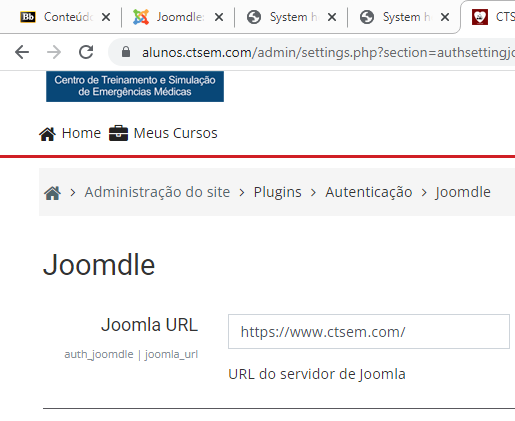
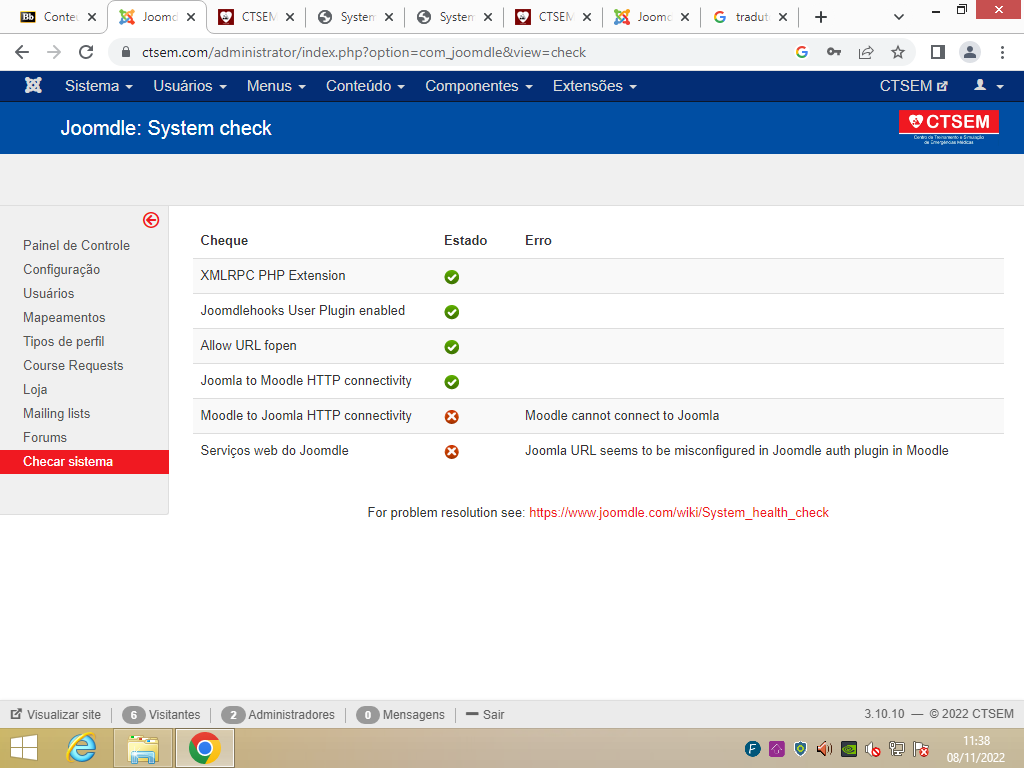
after updating joomdle I have the error Joomla URL seems to be misconfigured in Joomdle auth plugin in Moodle.
I've already checked all the basic alternatives, checked the urls and disabled mod_segurity on both servers.
Joomla 3.10 e Moodle 3.8.
I checked the firewall and the ips of the servers are not blocked.
What could be happening?
O domínio do joomla é www.ctsem.com/
Do Moodle alunos.ctsem.com/
Error Moodle cannot connect to Joomla after updating joomdle was created by topweb
after updating joomdle I have the error Joomla URL seems to be misconfigured in Joomdle auth plugin in Moodle.
I've already checked all the basic alternatives, checked the urls and disabled mod_segurity on both servers.
Joomla 3.10 e Moodle 3.8.
I checked the firewall and the ips of the servers are not blocked.
What could be happening?
O domínio do joomla é www.ctsem.com/
Do Moodle alunos.ctsem.com/
Last edit: 3 years 10 months ago by topweb.
Please Log in or Create an account to join the conversation.
- Antonio Durán
-

- Offline
- Moderator
-

Less
More
- Posts: 7848
3 years 10 months ago #2
by Antonio Durán
Replied by Antonio Durán on topic Error Moodle cannot connect to Joomla after updating joomdle
Hi.
You can try using REST instead of XMLRPC to see if that helps.
Also, you said this happened after you upgraded Joomdle, but I have never seen an upgrade causing this problem, so maybe it is not related and you made some other changes at the same time?
If you have SSH access to the server, you can try using curl at the command line to see if there are any connection problems.
You can try using REST instead of XMLRPC to see if that helps.
Also, you said this happened after you upgraded Joomdle, but I have never seen an upgrade causing this problem, so maybe it is not related and you made some other changes at the same time?
If you have SSH access to the server, you can try using curl at the command line to see if there are any connection problems.
Please Log in or Create an account to join the conversation.
- topweb
-
Topic Author
- Offline
- New Member
-
Less
More
- Posts: 10
3 years 10 months ago #3
by topweb
Replied by topweb on topic Error Moodle cannot connect to Joomla after updating joomdle
At first nothing was done.
I tested with REST and it didn't work.
the curl is ok.
I tested with REST and it didn't work.
the curl is ok.
Please Log in or Create an account to join the conversation.
- Antonio Durán
-
- Offline
- Moderator
-
Less
More
- Posts: 7848
3 years 10 months ago #4
by Antonio Durán
Replied by Antonio Durán on topic Error Moodle cannot connect to Joomla after updating joomdle
Can you post the curl? You need to do it from Moodle server to Joomla server.
Please Log in or Create an account to join the conversation.
- topweb
-
Topic Author
- Offline
- New Member
-
Less
More
- Posts: 10
3 years 10 months ago #5
by topweb
Replied by topweb on topic Error Moodle cannot connect to Joomla after updating joomdle
As I need an emergency situation I moved the 2 sites to the same server. And it worked.
Please Log in or Create an account to join the conversation.
- Antonio Durán
-
- Offline
- Moderator
-
Less
More
- Posts: 7848
3 years 10 months ago #6
by Antonio Durán
Replied by Antonio Durán on topic Error Moodle cannot connect to Joomla after updating joomdle
Good to know that at least you got it working.
Please Log in or Create an account to join the conversation.
- topweb
-
Topic Author
- Offline
- New Member
-
Less
More
- Posts: 10
3 years 10 months ago #7
by topweb
Replied by topweb on topic Error Moodle cannot connect to Joomla after updating joomdle
Thank you very much for your help Antonio.
I really didn't understand what was happening, I disabled mod_segurity on the 2 servers, checked the firewall of both, anyway kkkkk.
But with the two urls in both domains it worked, which indicates that the settings were ok. Really the problem must be some communication between the servers.
But anyway. thanks.
I really didn't understand what was happening, I disabled mod_segurity on the 2 servers, checked the firewall of both, anyway kkkkk.
But with the two urls in both domains it worked, which indicates that the settings were ok. Really the problem must be some communication between the servers.
But anyway. thanks.
Please Log in or Create an account to join the conversation.