
- Posts: 3
Joomdle 1.0 Installation
System Health Check Error
- neiliob1973
- Topic Author
- Offline
- New Member
-

Less
More
8 years 10 months ago #1
by neiliob1973
System Health Check Error was created by neiliob1973
I used a Joomla-Moodle setup (via Joomdle) on a home/private server for testing and all went well. But when I duplicated the steps on a hosted server here, I keep getting Joomdle Web Service errors. I have scoured several forums and tried their solutions (delete & generate new tokens in both Moodle and Joomla, verify the user is authorised as a system-user for the connection, etc), but no luck. I have even uninstalled the Joomdle Component from the Joomla install (several times), deleted the MySQL db (several times), and went so far as to delete the Moodle install, and reinstall it. One thing I have NOT done was put Moodle on a subdomain, but my test server worked fine with Moodle in a sub-directory (mysite.com/moodle)
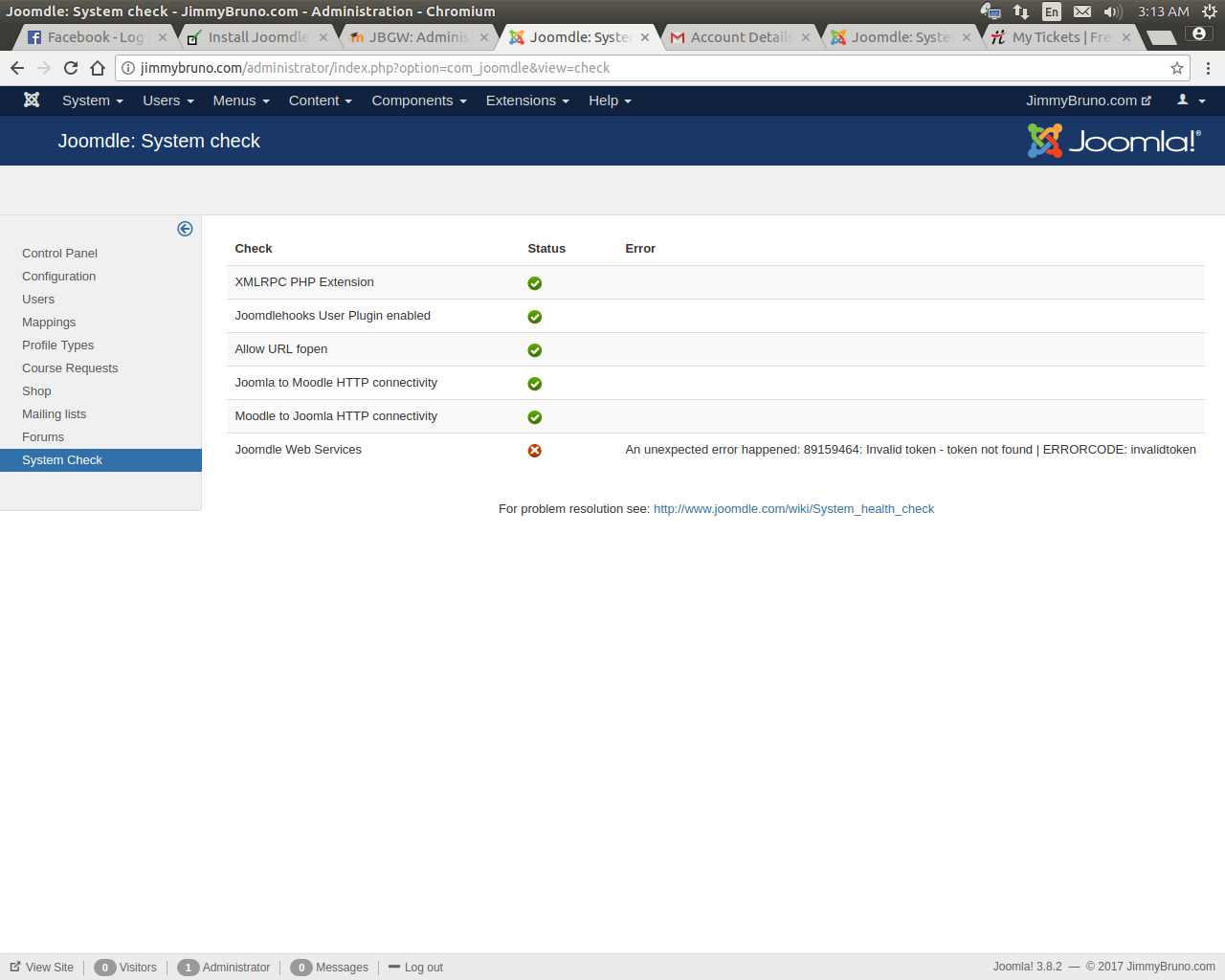
I keep getting all green until the last item: Joomdle Web Services ...An unexpected error happened: 89159464: Invalid token - token not found | ERRORCODE: invalidtoken
As I said, the same steps used to do this successfully on a local test server worked just fine. Not sure what the problem is.
Any ideas?
I keep getting all green until the last item: Joomdle Web Services ...An unexpected error happened: 89159464: Invalid token - token not found | ERRORCODE: invalidtoken
As I said, the same steps used to do this successfully on a local test server worked just fine. Not sure what the problem is.
Any ideas?
Please Log in or Create an account to join the conversation.
- Antonio Durán
-

- Offline
- Moderator
-

Less
More
- Posts: 7848
8 years 10 months ago #2
by Antonio Durán
Replied by Antonio Durán on topic System Health Check Error
It seems you have not correclty entered the Moodle token in Joomdle config in Joomla, or for some reason the token does not exist in Moodle.
Go to Moodle->Plugins->Web Services and check tokens, and compare with your configuration.
Go to Moodle->Plugins->Web Services and check tokens, and compare with your configuration.
Please Log in or Create an account to join the conversation.
- neiliob1973
- Topic Author
- Offline
- New Member
-
Less
More
- Posts: 3
8 years 10 months ago #3
by neiliob1973
Replied by neiliob1973 on topic System Health Check Error
#ashamed  I either need more sleep, or more coffee! I assumed that the copy/paste would do JUST that...copy and paste. And it did...including the TRAILING EMPTY SPACE after the token! # I feel so silly, and I apologize for wasting your time (and mine, too! LOL).
So, here is my PUBLIC SERVICE ANNOUNCEMENT:
When you copy & paste, be sure to verify that you copy ONLY the characters you want, and double-check for leading and/or trailing empty space. (and if you need sleep, TAKE IT!)
Seriously, thanks for answering so quickly. On a deadline, and you caused me to look at it with fresh eyes...and that did the trick.
I either need more sleep, or more coffee! I assumed that the copy/paste would do JUST that...copy and paste. And it did...including the TRAILING EMPTY SPACE after the token! # I feel so silly, and I apologize for wasting your time (and mine, too! LOL).So, here is my PUBLIC SERVICE ANNOUNCEMENT:
When you copy & paste, be sure to verify that you copy ONLY the characters you want, and double-check for leading and/or trailing empty space. (and if you need sleep, TAKE IT!)
Seriously, thanks for answering so quickly. On a deadline, and you caused me to look at it with fresh eyes...and that did the trick.
Please Log in or Create an account to join the conversation.
- Antonio Durán
-
- Offline
- Moderator
-
Less
More
- Posts: 7848
8 years 10 months ago #4
by Antonio Durán
Replied by Antonio Durán on topic System Health Check Error
Glad to know I could help. Your problem description also makes me realize what we can improve it, trimming token before saving it in configuration, as token will never have spaces anyway. This way, we can avoid the same problem in the future.
Please Log in or Create an account to join the conversation.