
Joomdle 1.0 Installation
[Closed] Error during configuration Joomdle for Joomla.
- Victor
- Topic Author
- Visitor
-

11 years 9 months ago - 11 years 9 months ago #1
by Victor
[Closed] Error during configuration Joomdle for Joomla. was created by Victor
After performing the general configuration Joomdle for Joomla takes you to the main menu, when you try to continue configuration disconnects from the server. Server MAMP 3, Moodle 2.8, Joomla 3.3.8, OS X 10.8.5 MacBookPro
Last edit: 11 years 9 months ago by Chris.
Please Log in or Create an account to join the conversation.
- Chris
-

- Offline
- Moderator
-

Less
More
11 years 9 months ago #2
by Chris
Replied by Chris on topic Error during configuration Joomdle for Joomla.
Hi there,
I do not quite follow your description. After general configuration .... main menu? Are you talking about Joomla front end or back end? After you press a button? I do not quite understand your process here.
Similar with "disconnects from the server". There is no server connection in Joomla as there is no desktop client. Are you saying that you loose your login / browser session? Are you referring to connection between Joomla and Moodle?
What does you system health check say?
Also, note if you search through the forum you will see those who try with MAMP have the greatest problems.
I do not quite follow your description. After general configuration .... main menu? Are you talking about Joomla front end or back end? After you press a button? I do not quite understand your process here.
Similar with "disconnects from the server". There is no server connection in Joomla as there is no desktop client. Are you saying that you loose your login / browser session? Are you referring to connection between Joomla and Moodle?
What does you system health check say?
Also, note if you search through the forum you will see those who try with MAMP have the greatest problems.
Please Log in or Create an account to join the conversation.
- Victor
- Topic Author
- Visitor
-
11 years 9 months ago - 11 years 9 months ago #3
by Victor
Replied by Victor on topic Error during configuration Joomdle for Joomla.
"Configuring Joomdle for Joomla!
Configuring Joomdle for Joomla! is done through the Configuration screen which can be found by choosing Configuration option in the Joomdle Component menu, or through the Joomdle dashboard. There are several sections that you can configure, however, only some items are mandatory to start.
General config
In this section you can configure Joomdle basic settings. "
I did this step and came to main menu Joomdle. The next step lead to errors.
I work on localhost. It is a local server.
The similar error origins when trying User, Forum and health.
Configuring Joomdle for Joomla! is done through the Configuration screen which can be found by choosing Configuration option in the Joomdle Component menu, or through the Joomdle dashboard. There are several sections that you can configure, however, only some items are mandatory to start.
General config
In this section you can configure Joomdle basic settings. "
I did this step and came to main menu Joomdle. The next step lead to errors.
I work on localhost. It is a local server.
The similar error origins when trying User, Forum and health.
Last edit: 11 years 9 months ago by Victor.
Please Log in or Create an account to join the conversation.
- Chris
-
- Offline
- Moderator
-
11 years 9 months ago - 11 years 9 months ago #4
by Chris
Replied by Chris on topic Error during configuration Joomdle for Joomla.
"I did this step and came to main menu Joomdle." This is normal behaviour when you press the Save and Close Button.
"The next step leads to errors". What errors do you see? At this point the only other section you should be looking at is the System Health Check. If they are not all Green checks, you should not be moving on to other areas.
"The next step leads to errors". What errors do you see? At this point the only other section you should be looking at is the System Health Check. If they are not all Green checks, you should not be moving on to other areas.
Last edit: 11 years 9 months ago by Chris.
Please Log in or Create an account to join the conversation.
- Victor
- Topic Author
- Visitor
-
11 years 9 months ago - 11 years 9 months ago #5
by Victor
Replied by Victor on topic Error during configuration Joomdle for Joomla.
I found mu mistake- :8888 after localhost. Now config is OK. But health check gives 3 reds in the end. On "http::/yoursite.com/index.php?option=com_joomdle&task=ws.server&format=xmlrpc" I recieved answer: XML-RPC Error (1): Token ...
I check tokens - all right.
There are too special users in the instruction: Joomdle_ connector and Joomla System. Are they different or the same in Moodle and in Joomla?
I didn't find command "error_reporting = E_ALL & ~E_DEPRECATED" in php.inis. There is "error_reporting = E_ALL & ~E_NOTICE". Are they different or same?
What other server can you advise for Mac if MAMP doesn't work?
I check tokens - all right.
There are too special users in the instruction: Joomdle_ connector and Joomla System. Are they different or the same in Moodle and in Joomla?
I didn't find command "error_reporting = E_ALL & ~E_DEPRECATED" in php.inis. There is "error_reporting = E_ALL & ~E_NOTICE". Are they different or same?
What other server can you advise for Mac if MAMP doesn't work?
Last edit: 11 years 9 months ago by Victor.
Please Log in or Create an account to join the conversation.
- Chris
-
- Offline
- Moderator
-
11 years 9 months ago #6
by Chris
Replied by Chris on topic Error during configuration Joomdle for Joomla.
The 3 red X at the end suggest that Joomla and Moodle cannot connect. You mention an XML-RPC error. Did you install and enable XML-RPC in your MAMP PHP?
As for recommending a stack, sorry we do not use MAC for any development work. It is not that it does not work as I know some others are using it. My comment is that it is appears to have more problems / challenges nor can we offer much advise on the implementation in that environment. With regards to other stacks, XAMPP is available on MAC OS but I cannot say how well it is supported.
As for recommending a stack, sorry we do not use MAC for any development work. It is not that it does not work as I know some others are using it. My comment is that it is appears to have more problems / challenges nor can we offer much advise on the implementation in that environment. With regards to other stacks, XAMPP is available on MAC OS but I cannot say how well it is supported.
Please Log in or Create an account to join the conversation.
- Victor
- Topic Author
- Visitor
-
11 years 9 months ago #7
by Victor
Replied by Victor on topic Error during configuration Joomdle for Joomla.
On your advice I reinstall server XAMPP on Win7 and instann Joomla!3.3 and Moodle 2.8. Befor installing Joomdle I want to repeat my question about Users.
There are too special users in the instruction: Joomdle_ connector and Joomla System. Are they different or the same in Moodle and in Joomla?
There are too special users in the instruction: Joomdle_ connector and Joomla System. Are they different or the same in Moodle and in Joomla?
Please Log in or Create an account to join the conversation.
- Chris
-
- Offline
- Moderator
-
11 years 9 months ago #8
by Chris
Replied by Chris on topic Error during configuration Joomdle for Joomla.
I do not wish to lead you astray. Therefore, which pages in the wiki are you referring to?
Please Log in or Create an account to join the conversation.
- Victor
- Topic Author
- Visitor
-
11 years 9 months ago - 11 years 9 months ago #9
by Victor
Replied by Victor on topic Error during configuration Joomdle for Joomla.
Create a specific user
Moodle's Web Services requires a "user" to connect with Joomdle.
To configure Moodle's Web Services, we need to define a specific "user" which will be given the appropriate access to "enter" / connect with Moodle. Ideally, this "user" should be used only for connecting Joomla to Moodle. It should not be used as a typical Joomla front end or Joomla backend user. Also, it should not be your Joomla or Moodle system admin user. For example, we created a user called joomdle connector.
Add user as authorized user for the service
Now that we have created a new service and added the appropriate functions (All Joomdle functions), we need to authorise / grant the Joomdle Web services 'user' to the newly created service. This is done in:
Site Administration->Plugins->Web services->External services
Click on Authorized users for the new service and add the Joomdle Web services user we created before.
(see picture)
Its name is "joomla system", but before was Joomdle connector.
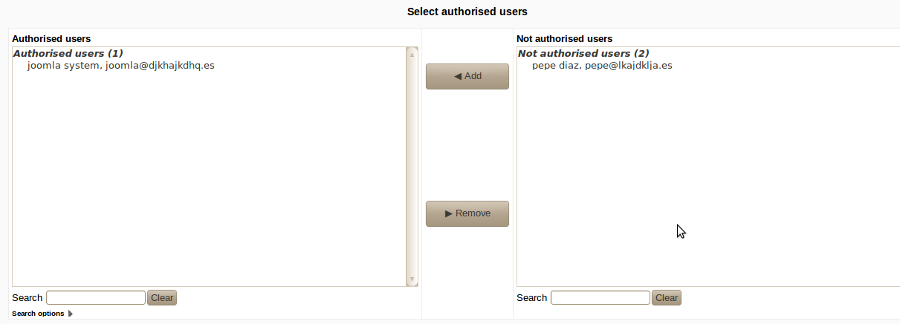
www.joomdle.com/wiki/Preparing_Moodle_20#Create_a_specific_user
Moodle's Web Services requires a "user" to connect with Joomdle.
To configure Moodle's Web Services, we need to define a specific "user" which will be given the appropriate access to "enter" / connect with Moodle. Ideally, this "user" should be used only for connecting Joomla to Moodle. It should not be used as a typical Joomla front end or Joomla backend user. Also, it should not be your Joomla or Moodle system admin user. For example, we created a user called joomdle connector.
Add user as authorized user for the service
Now that we have created a new service and added the appropriate functions (All Joomdle functions), we need to authorise / grant the Joomdle Web services 'user' to the newly created service. This is done in:
Site Administration->Plugins->Web services->External services
Click on Authorized users for the new service and add the Joomdle Web services user we created before.
(see picture)
Its name is "joomla system", but before was Joomdle connector.
www.joomdle.com/wiki/Preparing_Moodle_20#Create_a_specific_user
Last edit: 11 years 9 months ago by Victor.
Please Log in or Create an account to join the conversation.
- Chris
-
- Offline
- Moderator
-
11 years 9 months ago #10
by Chris
Replied by Chris on topic Error during configuration Joomdle for Joomla.
Yes this is the same thing. You can choose any name you want and it is best to ensure the name is not a name you are going to use to log in with (admin, student, teacher, etc.) ie a name that is specific for this purpose.
Please Log in or Create an account to join the conversation.