
- Posts: 19
How To / General
assignment activity problem in wrapper for teachers
- Yusef
- Topic Author
- Offline
- New Member
-

Less
More
5 years 8 months ago #1
by Yusef
assignment activity problem in wrapper for teachers was created by Yusef
Hello.
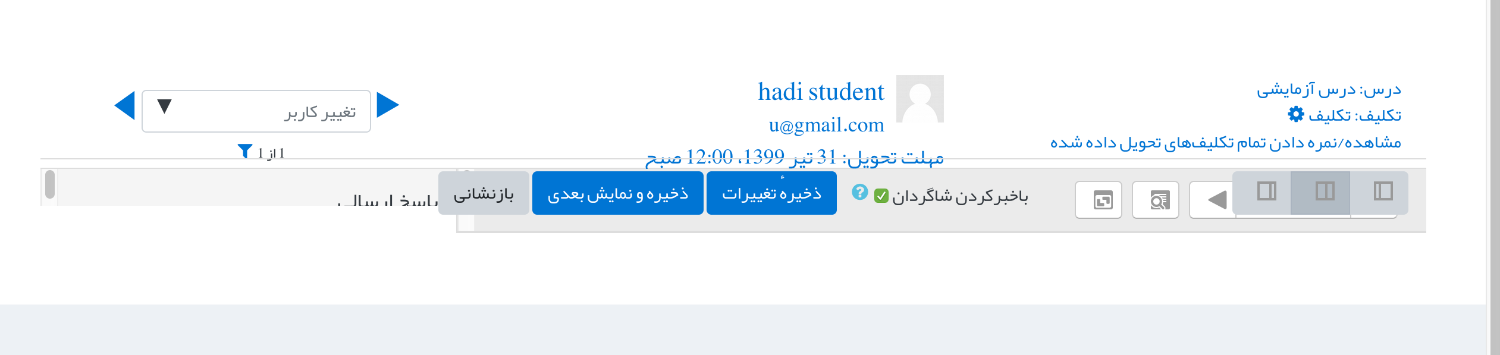
When I have “assignment activity” in Moodle, it shows up perfectly in the students joomdle wrapper. when teachers are logging through moodle itself, it is fine too. But when logged in as a teacher through joomla, it shows everything mixed up in the wrapper and teachers see no content. I'm attaching the picture.
I'm using joomla 3.8
moodle 3.9
joomdle 1.2.7
thank you.
When I have “assignment activity” in Moodle, it shows up perfectly in the students joomdle wrapper. when teachers are logging through moodle itself, it is fine too. But when logged in as a teacher through joomla, it shows everything mixed up in the wrapper and teachers see no content. I'm attaching the picture.
I'm using joomla 3.8
moodle 3.9
joomdle 1.2.7
thank you.
Please Log in or Create an account to join the conversation.
- Antonio Durán
-

- Offline
- Moderator
-

Less
More
- Posts: 7848
5 years 8 months ago #2
by Antonio Durán
Replied by Antonio Durán on topic assignment activity problem in wrapper for teachers
Sorry, I don't know the reason for that. You can try with different templates to see if the problem persists.
Please Log in or Create an account to join the conversation.
- Yusef
- Topic Author
- Offline
- New Member
-
Less
More
- Posts: 19
5 years 8 months ago #3
by Yusef
Replied by Yusef on topic assignment activity problem in wrapper for teachers
thank you Antonio
I used different themes. Even Protostar (joomla's default theme) has the same problem.
I can give you access to the course if it helps.
thanks.
I used different themes. Even Protostar (joomla's default theme) has the same problem.
I can give you access to the course if it helps.
thanks.
Please Log in or Create an account to join the conversation.
- Antonio Durán
-
- Offline
- Moderator
-
Less
More
- Posts: 7848
5 years 8 months ago #4
by Antonio Durán
Replied by Antonio Durán on topic assignment activity problem in wrapper for teachers
I meant different Moodle themes.
Please Log in or Create an account to join the conversation.
- Yusef
- Topic Author
- Offline
- New Member
-
Less
More
- Posts: 19
5 years 8 months ago #5
by Yusef
Replied by Yusef on topic assignment activity problem in wrapper for teachers
I'm using classic theme. not third party one.
I found this in codes when loading assignment activity:
<iframe id="blockrandom" class="autoHeight" src=" mysite.com/system/course/view.php?id=2&theme=classic " width="100%" scrolling="auto" align="top" frameborder="0" onload="itspower(this, false, true, 20)" webkitallowfullscreen="" mozallowfullscreen="" allowfullscreen="" height="136">
I know the problem is height="136". but I don't know where to fix it.
in other activities I see that the height is more than "2000"
I found this in codes when loading assignment activity:
<iframe id="blockrandom" class="autoHeight" src=" mysite.com/system/course/view.php?id=2&theme=classic " width="100%" scrolling="auto" align="top" frameborder="0" onload="itspower(this, false, true, 20)" webkitallowfullscreen="" mozallowfullscreen="" allowfullscreen="" height="136">
I know the problem is height="136". but I don't know where to fix it.
in other activities I see that the height is more than "2000"
Please Log in or Create an account to join the conversation.
- Antonio Durán
-
- Offline
- Moderator
-
Less
More
- Posts: 7848
5 years 8 months ago #6
by Antonio Durán
Replied by Antonio Durán on topic assignment activity problem in wrapper for teachers
> I'm using classic theme. not third party one.
Try using Boost, just to see if you have the same issue.
You can also try disabling auto-height in wrapper in Joomdle config in Joomla, to see if problem is related to that, now that you say height is wrong.
Try using Boost, just to see if you have the same issue.
You can also try disabling auto-height in wrapper in Joomdle config in Joomla, to see if problem is related to that, now that you say height is wrong.
Please Log in or Create an account to join the conversation.