
- Posts: 32
How To / General
Wrapper Rendering For External JS
- Adolfina Bory Palobo
- Topic Author
- Offline
- Junior Member
-

Less
More
7 years 3 weeks ago #1
by Adolfina Bory Palobo
Wrapper Rendering For External JS was created by Adolfina Bory Palobo
In a previous post,
www.joomdle.com/forum/feature-requests/12495-avoiding-wrapping
I attached screenshots showing that Mathjax filter and Geogebra filter do not render properly using Joomdle wrapping in Joomla.
To test this, just create a topic in Moodle and enter the following:
The point \( \left( {{x}_{0}}+\frac{1}{p\left( {{x}_{0}} \right)}\ ,\ \frac{q\left( {{x}_{0}} \right)}{p\left( {{x}_{0}} \right)} \right) \) is located...
Mathhax filter is enabled by default in Moodle.
In Joomla, the Mathjax does not get rendered properly. By default Mathjax js is pulled from cdnjs.cloudflare.com/ajax/libs/mathjax/2.7.2/MathJax.js
Is this a bug or a feature of iframe wrapping ? Is it due to the iframe not being permitted to load the external js?
I attached screenshots showing that Mathjax filter and Geogebra filter do not render properly using Joomdle wrapping in Joomla.
To test this, just create a topic in Moodle and enter the following:
The point \( \left( {{x}_{0}}+\frac{1}{p\left( {{x}_{0}} \right)}\ ,\ \frac{q\left( {{x}_{0}} \right)}{p\left( {{x}_{0}} \right)} \right) \) is located...
Mathhax filter is enabled by default in Moodle.
In Joomla, the Mathjax does not get rendered properly. By default Mathjax js is pulled from cdnjs.cloudflare.com/ajax/libs/mathjax/2.7.2/MathJax.js
Is this a bug or a feature of iframe wrapping ? Is it due to the iframe not being permitted to load the external js?
Please Log in or Create an account to join the conversation.
- Adolfina Bory Palobo
- Topic Author
- Offline
- Junior Member
-
Less
More
- Posts: 32
7 years 3 weeks ago #2
by Adolfina Bory Palobo
Replied by Adolfina Bory Palobo on topic Wrapper Rendering For External JS
I placed Mathjax on the local server in /MathJax/MathJax.js
This rendered math OK in Moodle but not in Joomla (via Joomdle).
Conclusion: placing the js locally does not change anything.
This rendered math OK in Moodle but not in Joomla (via Joomdle).
Conclusion: placing the js locally does not change anything.
Please Log in or Create an account to join the conversation.
- Antonio Durán
-

- Offline
- Moderator
-

Less
More
- Posts: 7848
7 years 3 weeks ago #3
by Antonio Durán
Replied by Antonio Durán on topic Wrapper Rendering For External JS
Hi.
The wrapper works fine for most Moodle content, but some of it won't, or at least not right away.
That said: what you showed in the screenshot is not the wrapper, but the Joomdle course view right?
The wrapper works fine for most Moodle content, but some of it won't, or at least not right away.
That said: what you showed in the screenshot is not the wrapper, but the Joomdle course view right?
Please Log in or Create an account to join the conversation.
- Adolfina Bory Palobo
- Topic Author
- Offline
- Junior Member
-
Less
More
- Posts: 32
7 years 3 weeks ago #4
by Adolfina Bory Palobo
Replied by Adolfina Bory Palobo on topic Wrapper Rendering For External JS
Right, its the Joomdle Courses Module. I have Links - Open in New Window parameter set. So one workaround for me is to have that set and have the discipline not to use Mathjax, or Geogebra in the course introductions
Buit here is another example:
Moodle-Top-Level.jpg
Scroll down to Topic 1 - the formula is rendered OK
Joomla-Top-Level.jpg
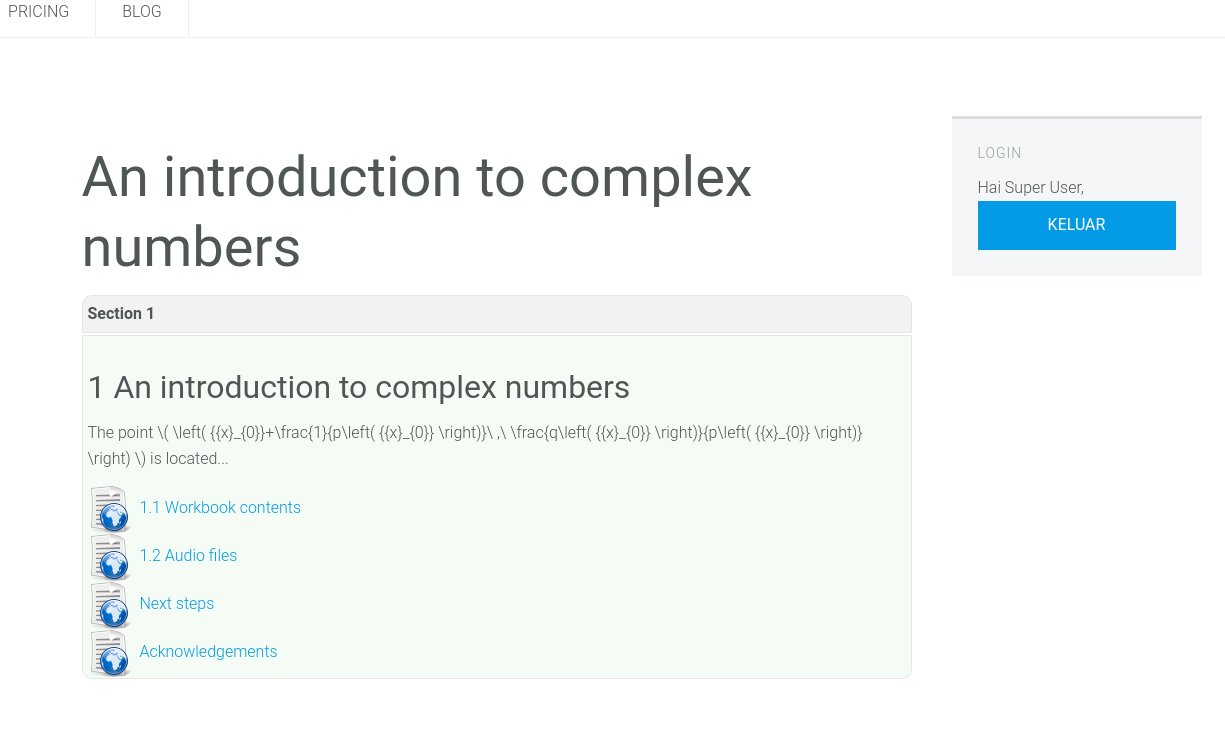
This is what appears after clicking the link from Joomdle Courses Module
Joomla-Contents.jpg
This is what appears after clicking the Contents link shown in the above image.
The formula is NOT rendered OK
As mentioned already, MathJax is a default feature of the Alto editor. It might be worth your while debugging this issue. To test, just enter"
\( \left( {{x}_{0}}+\frac{1}{p\left( {{x}_{0}} \right)}\ ,\ \frac{q\left( {{x}_{0}} \right)}{p\left( {{x}_{0}} \right)} \right) \)
In the Alto editor, or use the equation editor in Alto.
Buit here is another example:
Moodle-Top-Level.jpg
Scroll down to Topic 1 - the formula is rendered OK
Joomla-Top-Level.jpg
This is what appears after clicking the link from Joomdle Courses Module
Joomla-Contents.jpg
This is what appears after clicking the Contents link shown in the above image.
The formula is NOT rendered OK
As mentioned already, MathJax is a default feature of the Alto editor. It might be worth your while debugging this issue. To test, just enter"
\( \left( {{x}_{0}}+\frac{1}{p\left( {{x}_{0}} \right)}\ ,\ \frac{q\left( {{x}_{0}} \right)}{p\left( {{x}_{0}} \right)} \right) \)
In the Alto editor, or use the equation editor in Alto.


Please Log in or Create an account to join the conversation.
- Antonio Durán
-
- Offline
- Moderator
-
Less
More
- Posts: 7848
7 years 3 weeks ago #5
by Antonio Durán
Replied by Antonio Durán on topic Wrapper Rendering For External JS
You should not use the Joomdle course view if you are using Mathjax or Geogebra, as it is clear that it does not show well. Instead, try using the wrapper.
Looking at the output, I don't think it would be easy to make it work with course view.
Looking at the output, I don't think it would be easy to make it work with course view.
Please Log in or Create an account to join the conversation.